
Setup guide
How to add a GroupMe calendar to Google Calendar
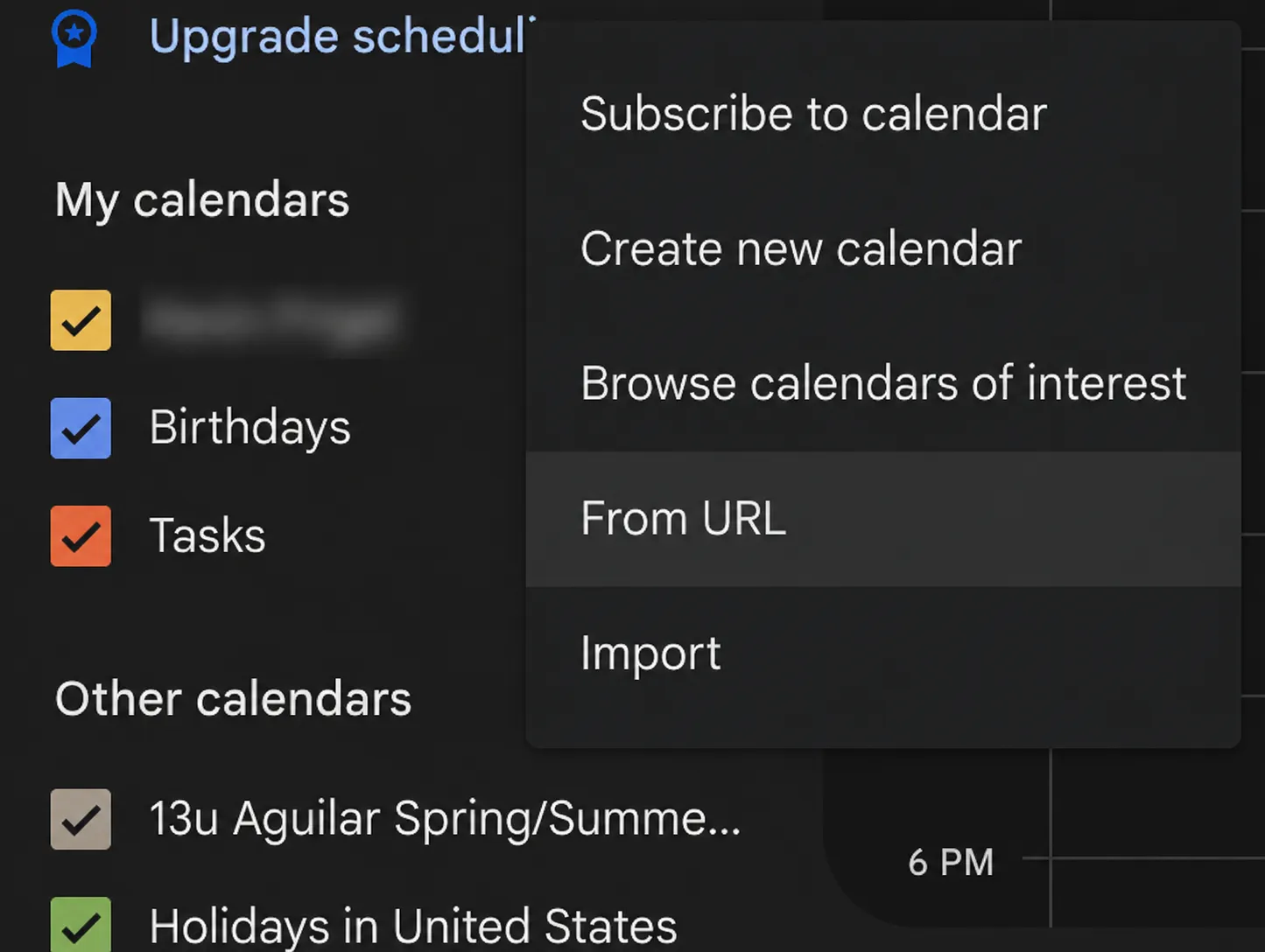
To add a GroupMe calendar to Google Calendar, connect GroupMe in gmCalSync, copy the private iCal link it generates for the group, then open Google Calendar on the web, click the "+" next to Other calendars, choose "From URL," paste the link, and click "Add calendar." Google refreshes the feed automatically from then on.
- Setup time
- About 5 minutes
- Works with
- Google, Apple, Outlook, Android, Skylight
- Calendar access
- Read-only private link
- Getting started
- Free trial, cancel anytime
Private links • Read-only • Free trial • Cancel anytime • Last updated July 22, 2026
Step-by-step
- Connect your GroupMe account on gmCalSync.
- Select the GroupMe group you want to sync.
- Copy the private iCal subscription link.
- Open Google Calendar in a web browser (choose "Desktop" view at the bottom of the page if you are on mobile).
- Click the "+" next to Other calendars, then choose "From URL."
- Paste the iCal link and click "Add calendar."
Tips
- Subscriptions refresh automatically. Google may take a few hours to show changes.
- Give each GroupMe feed a clear name so it is easy to identify.
- You can unsubscribe anytime from Google Calendar settings.
If events don't appear right away
A subscribed calendar is cached by Google, not pushed from gmCalSync, so a new GroupMe event shows up on Google's next refresh rather than instantly. Confirm the link was pasted in full, then give it a few hours before re-adding it. Read why subscription calendars update on a delay.
Frequently asked questions
How do I add a GroupMe calendar to Google Calendar?
Create a private iCal link for the group in gmCalSync, then in Google Calendar on the web click the "+" next to Other calendars, choose "From URL," paste the link, and click "Add calendar."
Can I do this from the Google Calendar mobile app?
No. The "From URL" option only exists in Google Calendar on the web. Add the calendar once from a browser and it then appears in the Google Calendar app on every device signed into the same account.
How long does Google take to show new GroupMe events?
Google refreshes subscribed calendars on its own schedule, usually within a few hours. gmCalSync updates the feed as soon as the GroupMe event changes; the delay comes from Google's refresh cycle.
Do I need to repeat this for every GroupMe group?
Yes, once per group. Each GroupMe group gets its own private iCal link so the calendars stay separate and easy to turn on or off in Google Calendar.
Related GroupMe calendar guides
Create your GroupMe calendar feed
Connect GroupMe once, pick the groups that matter, and gmCalSync generates a private calendar link for each one.
Private links • Read-only • Free trial • Cancel anytime