
One calendar, every group
Combine multiple GroupMe groups into one calendar
gmCalSync can merge up to 25 of your GroupMe groups into a single private iCal (ICS) subscription. You add one link to Google Calendar, Apple Calendar, or Outlook instead of one per group, and every event arrives labeled with the group it came from.
- Groups per calendar
- Up to 25 in one feed
- What you add
- One iCal (ICS) link
- Event labels
- Group name, custom label, or none
- Included with
- Your subscription and free trial
Private links • Read-only • Free trial • Cancel anytime • Last updated August 27, 2026
Why merge your groups
Every GroupMe group gets its own private feed, which is exactly right when you follow one team. It stops being right at six groups: six subscriptions to add on every device, six calendars to color-code, and six chances to forget one. A merged calendar collapses that into one subscription you set up once.
Add a single URL to your phone and laptop instead of repeating the setup for every group you belong to.
New groups you join can be folded in automatically, so a group you added last week is already on the calendar.
Group-name prefixes keep a busy week legible — you can tell a practice from a chapter meeting at a glance.
How to set it up
- Open your Groups page. Sign in to gmCalSync and go to Groups. The "One calendar for all my groups" card sits with your group list.
- Turn on the merged calendar. Flip the toggle on. Name the calendar whatever your calendar app should show — "Family", "Soccer Season", or the default "My GroupMe Calendar".
- Pick the groups to include. Check up to 25 groups. Leave "Automatically add new groups I join" on if you want future groups folded in without another visit.
- Choose how events are labeled. Keep group-name prefixes, set a short custom label per group, or turn prefixes off.
- Save and subscribe once. Save to get your private merged calendar link, then add that single link to Google Calendar, Apple Calendar, or Outlook.
Adding the link works exactly like a per-group feed. Follow the Google Calendar steps, Apple Calendar steps, or the Outlook steps — just paste the merged link instead of a single group's link.
How events are labeled
Merging groups only helps if you can still tell them apart. The merged calendar puts a label in front of each event title, and you choose which kind:
- Group name (recommended) — uses the GroupMe group's own name, or your custom label for that group if you set one.
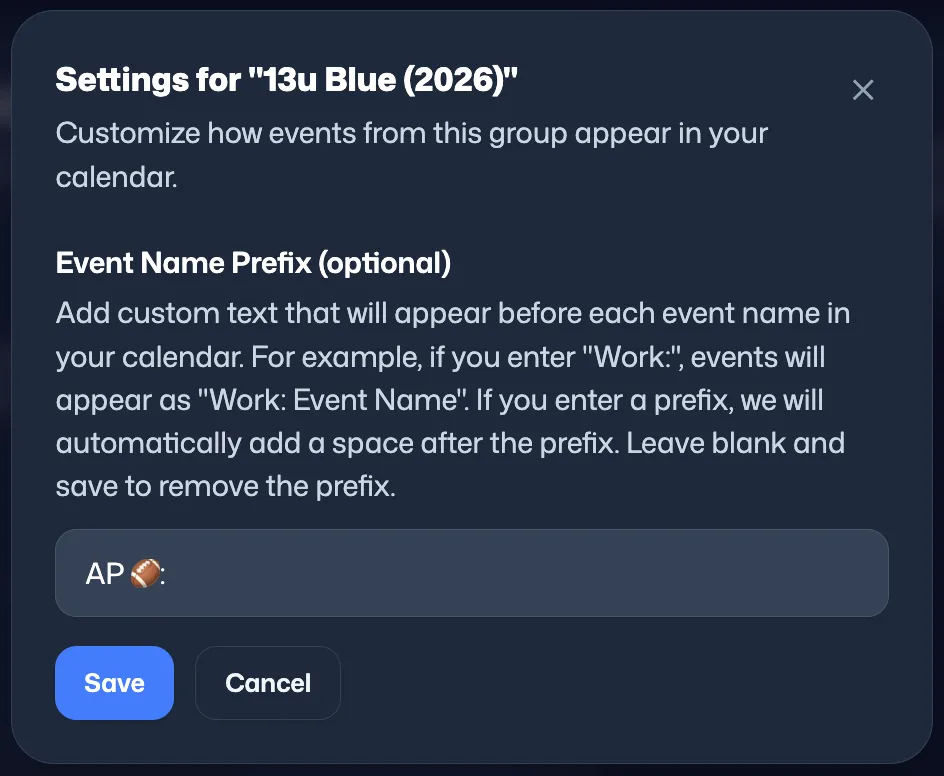
- Custom label only — uses just the short labels you set. Handy when GroupMe group names are long: Northside Soccer U12 Parents 2026 becomes NS ⚽. Groups without a label get no prefix.
- No prefix — events keep their original GroupMe titles.
A label is set once per group and shared with that group's individual feed, so a label you type here also shows up in the single-group calendar. That is the same field described on custom GroupMe event names.
Details and limits
What you get
- Up to 25 GroupMe groups in one feed.
- A calendar name of your choosing, up to 100 characters, shown by your calendar app.
- A private, read-only link — nothing is written back to GroupMe or to your calendar.
- Optional automatic inclusion of new groups you join.
- Cancelled events flagged the same way your per-group feeds flag them.
Worth knowing
- Per-group feeds are unaffected — the merged calendar sits alongside them.
- RSVP and attendance details are left out of the merged calendar.
- Leaving a GroupMe group drops it from the merged calendar automatically.
- Turning the merged calendar off stops that link immediately; your per-group links keep working.
- Refresh timing is set by your calendar app, not by us — here's why updates aren't instant.
Running a team or chapter where everyone needs the schedule? A merged calendar is per person. To hand one calendar to a whole roster, look at group plans instead.
Frequently asked questions
Can I combine multiple GroupMe groups into one calendar?
Yes. gmCalSync can merge up to 25 of your GroupMe groups into a single iCal (ICS) subscription link. You add that one link to Google Calendar, Apple Calendar, or Outlook and every group's events land on the same calendar.
How do I know which group an event came from?
Each event title can carry a label. By default the merged calendar prefixes every event with its GroupMe group name — "Northside Soccer: Practice" — so a packed week is still readable. You can swap in your own short label per group, or turn prefixes off entirely.
How many groups can one merged calendar hold?
Up to 25 groups in a single merged calendar. If you belong to more than 25 groups, pick the ones you want merged and keep per-group feeds for the rest.
Do my per-group calendar links still work?
Yes. The merged calendar is an addition, not a replacement. Every group keeps its own private feed, so you can subscribe to one group separately and still have it inside the merged calendar.
What happens when I join a new GroupMe group?
By default, new groups you join are folded into the merged calendar automatically, up to the 25-group limit. You can turn that off and choose each group by hand instead.
Is the merged calendar link private?
Yes. It is an unlisted, read-only URL with a long random key, and it only shows events from the groups you selected. Anyone you share it with sees the calendar, so share it the same way you would share the per-group links.
Does the merged calendar show who RSVP'd?
No. Per-group feeds can include your own attendance status, but the merged calendar leaves RSVP details out so it stays fast to refresh across many groups at once.
Do I need a separate subscription for the merged calendar?
No. It is part of your existing gmCalSync subscription — the same one that powers your per-group calendar feeds — and it is available during the free trial.
Can I turn the merged calendar off later?
Yes. Turning it off stops the merged feed and its URL right away, and your per-group feeds keep working exactly as before.
Related GroupMe calendar guides
Put every GroupMe group on one calendar
Connect GroupMe once, pick your groups, and subscribe to a single private link that carries all of them.
Private links • Read-only • Free trial • Cancel anytime